<?xml version="1.0" encoding="utf-8"?><feed xmlns="http://www.w3.org/2005/Atom" ><generator uri="https://jekyllrb.com/" version="4.3.2">Jekyll</generator><link href="https://blog.petdance.com/feed.xml" rel="self" type="application/atom+xml" /><link href="https://blog.petdance.com/" rel="alternate" type="text/html" /><updated>2023-08-22T21:43:31-05:00</updated><id>https://blog.petdance.com/feed.xml</id><title type="html">Andy Lester’s blog</title><subtitle></subtitle><author><name>Andy Lester</name></author><entry><title type="html">How to enable Vim 9’s new popup menu</title><link href="https://blog.petdance.com/2022/07/12/vim-9-new-popup-menu/" rel="alternate" type="text/html" title="How to enable Vim 9’s new popup menu" /><published>2022-07-12T22:43:17-05:00</published><updated>2022-07-12T22:43:17-05:00</updated><id>https://blog.petdance.com/2022/07/12/vim-9-new-popup-menu</id><content type="html" xml:base="https://blog.petdance.com/2022/07/12/vim-9-new-popup-menu/"><![CDATA[<p><a href="https://www.vim.org/vim90.php">vim 9.0</a> has been released. I haven’t done much with it, but I did immediately go and
enable the new popup menu for autocompletions. It’s so much nicer than having the autocompletion options running
horizontally across the screen.</p>

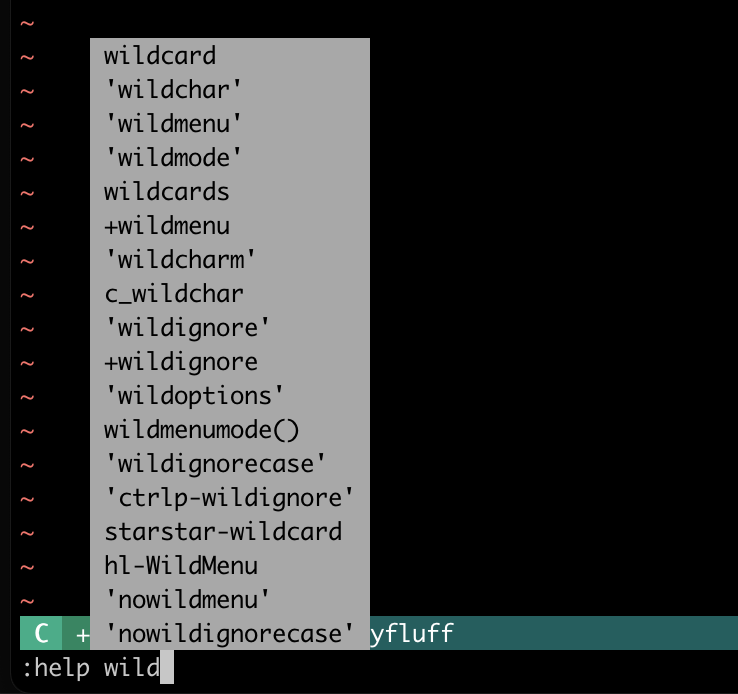
<p>The new popup menu looks like this:</p>

<p><img src="/assets/images/2022/vim-popup-menu-example.png" alt="Example of popup menu" /></p>

<p>Here are the relevant lines from my <code class="language-plaintext highlighter-rouge">.vimrc</code> file:</p>

<div class="language-plaintext highlighter-rouge"><div class="highlight"><pre class="highlight"><code>set wildchar=&lt;Tab&gt;
set wildmenu
if v:version &gt;= 900
    " Set popup menu
    set wildoptions=pum
endif
set wildmode=longest:full,full
set wildignore=*~,#*#,*.sw?,*.o,*.class,.viminfo,*.pdf,*.mp3,*.gz,*.tgz,*.gif,*.jpg,*.png
</code></pre></div></div>

<p>The new thing is:</p>

<div class="language-plaintext highlighter-rouge"><div class="highlight"><pre class="highlight"><code>if v:version &gt;= 900
    " Set popup menu
    set wildoptions=pum
endif
</code></pre></div></div>

<p>I check the vim version because not everyone machine I work on is using vim 9 yet.</p>]]></content><author><name>Andy Lester</name></author><category term="Unix" /><category term="vim" /><summary type="html"><![CDATA[vim 9.0 has been released. I haven’t done much with it, but I did immediately go and enable the new popup menu for autocompletions. It’s so much nicer than having the autocompletion options running horizontally across the screen.]]></summary></entry><entry><title type="html">A handy collection of shell aliases from my bash startup</title><link href="https://blog.petdance.com/2020/02/03/handy-collection-of-shell-aliases/" rel="alternate" type="text/html" title="A handy collection of shell aliases from my bash startup" /><published>2020-02-03T21:53:17-06:00</published><updated>2020-02-03T21:53:17-06:00</updated><id>https://blog.petdance.com/2020/02/03/collection-of-handy-aliases</id><content type="html" xml:base="https://blog.petdance.com/2020/02/03/handy-collection-of-shell-aliases/"><![CDATA[<p>A common topic in the <code class="language-plaintext highlighter-rouge">#shell</code> channel in the
<a href="http://www.chicagotechslack.com/">Chicago Tech Slack</a>
is what people have as shell aliases.  Here are some handy aliases from my
<code class="language-plaintext highlighter-rouge">aliases.sh</code> that runs at shell startup.</p>

<h2 id="customized-ls">Customized <code class="language-plaintext highlighter-rouge">ls</code></h2>

<p>Most unixes have an <code class="language-plaintext highlighter-rouge">ls</code> for a short version of the <code class="language-plaintext highlighter-rouge">ls</code> command, and then
<code class="language-plaintext highlighter-rouge">ll</code> for <code class="language-plaintext highlighter-rouge">ls -al</code>.  Here’s my version of that.</p>

<p>First, the color options are different on macOS <code class="language-plaintext highlighter-rouge">ls</code> than Linux <code class="language-plaintext highlighter-rouge">ls</code>, so
there are two different aliases depending on OS.  The <code class="language-plaintext highlighter-rouge">-Fp</code> options tell
<code class="language-plaintext highlighter-rouge">ls</code> to print symbols as annotations for the names listed in the output.</p>

<div class="language-plaintext highlighter-rouge"><div class="highlight"><pre class="highlight"><code>if [ "${OSTYPE:0:6}" == 'darwin' ] ; then
    # Mac has -G for color.
    alias ls='ls -GFp'
    alias ll='ls -GFp -l'
else
    alias ls='ls -Fp --color=auto'
    alias ll='ls -Fp --color=auto -l'
fi
</code></pre></div></div>

<p>Then, if I’m on a machine that has <code class="language-plaintext highlighter-rouge">exa</code> installed, use that instead.
<code class="language-plaintext highlighter-rouge">exa</code> is an <a href="https://altbox.dev/exa/">enhanced version of <code class="language-plaintext highlighter-rouge">ls</code></a>, but I
don’t have it installed everywhere.</p>

<div class="language-plaintext highlighter-rouge"><div class="highlight"><pre class="highlight"><code># If we have exa, update ll to use it instead.
hash exa 2&gt;/dev/null &amp;&amp; alias ll='exa -F -l -B --git'
</code></pre></div></div>

<h2 id="git-and-subversion-statuses">Git and Subversion statuses</h2>

<p>I work with both Git and Subversion throughout the day, so I have aliases for both.</p>

<div class="language-plaintext highlighter-rouge"><div class="highlight"><pre class="highlight"><code># Show me status of files, but not files Subversion doesn't recognize.
alias ssq='svn status -q'

# Show what was changed in the most recent commit.
alias sdrp='svn diff -rPREV'

# Show the log entry for the most recent commit.
alias slrp='svn log -rPREV:COMMITTED'

# Git version of "ssq" above.
alias gsq='git status -sb'
alias gpr='git pull --rebase --stat'
</code></pre></div></div>

<h2 id="show-processes-that-use-the-most-memory">Show processes that use the most memory.</h2>

<p><a href="https://twitter.com/edlitmus">Ed Silva</a> gave me this long ago.  I keep
it around because <code class="language-plaintext highlighter-rouge">ps</code>’s options are the worst to remember.</p>

<div class="language-plaintext highlighter-rouge"><div class="highlight"><pre class="highlight"><code>alias memusage='ps -o rss,command -waxc | sort -n'
</code></pre></div></div>

<h2 id="show-my-running-processes">Show my running processes.</h2>

<p>Speaking of <code class="language-plaintext highlighter-rouge">ps</code> and running progresses, I originally had an alias called
<code class="language-plaintext highlighter-rouge">paga</code> that ran <code class="language-plaintext highlighter-rouge">ps aux | grep alester</code>, but now it’s expanded to do a lot
more, and not care what user I’m logged in as.</p>

<div class="language-plaintext highlighter-rouge"><div class="highlight"><pre class="highlight"><code>alias paga='ps -u "$USER" f --header -o pid,ppid,start_time,%cpu,rssize=Resident,vsize=Virtual,cmd'
</code></pre></div></div>

<p>The output from <code class="language-plaintext highlighter-rouge">paga</code> shows only my running processes and in a tree format.</p>

<div class="language-plaintext highlighter-rouge"><div class="highlight"><pre class="highlight"><code>  PID  PPID START %CPU Resident Virtual CMD
18022 18020 21:44  0.0     2732  155040 sshd: andy@pts/0,pts/1
18023 18022 21:44  0.0     6092  119324  \_ -bash
18726 18023 22:07  0.0     1612  155368  |   \_ ps -u andy f --header -o pid,ppid,start_time,%cpu,rssize=Resident,vsize=Virtual,cmd
18441 18022 22:05  0.0     6112  119324  \_ -bash
18662 18441 22:07  0.7     8356  152236      \_ vim .bashrc
18724 18662 22:07  0.0     1200  113184          \_ /bin/bash -c (find /) &gt;/tmp/v0sA0Oq/11 2&gt;&amp;1
18725 18724 22:07 52.5     1828  120664              \_ find /
</code></pre></div></div>

<h2 id="directory-jumps">Directory jumps</h2>

<p><code class="language-plaintext highlighter-rouge">up</code> is only three characters shorter than <code class="language-plaintext highlighter-rouge">cd ..</code>, but I don’t even want to think about it.</p>

<div class="language-plaintext highlighter-rouge"><div class="highlight"><pre class="highlight"><code>alias up='cd ..'
alias upup='cd ../..'
</code></pre></div></div>

<h2 id="vim-aliases">Vim aliases</h2>

<p>I use <code class="language-plaintext highlighter-rouge">:e</code> in vim to open a new file, but sometimes I forget I’m in the
shell, and use <code class="language-plaintext highlighter-rouge">:e filename</code> when I mean to use <code class="language-plaintext highlighter-rouge">vim filename</code>.  This alias
makes it work anyway.</p>

<div class="language-plaintext highlighter-rouge"><div class="highlight"><pre class="highlight"><code>alias ':e'=vim
</code></pre></div></div>

<p>I use <code class="language-plaintext highlighter-rouge">vimdiff</code> to show file differences all the time, but sometimes I need
it to ignore whitespace.  This is how.</p>

<div class="language-plaintext highlighter-rouge"><div class="highlight"><pre class="highlight"><code>alias vimdiffx='vimdiff -c "set diffopt+=iwhite"'
</code></pre></div></div>

<h2 id="set-up-an-ssh-tunnel">Set up an SSH tunnel.</h2>

<p>If I’m on public wifi, I set up a tunnel to my dev machine that my web browser can proxy through.  I run this tunnel command and
tell my browser to use port 8080 on localhost as a SOCKS5 proxy.</p>

<div class="language-plaintext highlighter-rouge"><div class="highlight"><pre class="highlight"><code>alias cliffordtunnel='ssh -N -f -D8080 tunnel@clifford.petdance.com'
</code></pre></div></div>

<h2 id="dump-http-headers">Dump HTTP headers</h2>

<p>I often want to contact a website and see the HTTP headers, without the content.  This command does it.</p>

<div class="language-plaintext highlighter-rouge"><div class="highlight"><pre class="highlight"><code>alias headerdump='curl -D- -o/dev/null'
</code></pre></div></div>

<p>Are any of these helpful?  Should I list more about my shell setup?  Let me know at andy@petdance.com.</p>]]></content><author><name>Andy Lester</name></author><category term="Unix" /><category term="shell" /><category term="bash" /><category term="aliases" /><category term="ls" /><category term="exa" /><summary type="html"><![CDATA[A common topic in the #shell channel in the Chicago Tech Slack is what people have as shell aliases. Here are some handy aliases from my aliases.sh that runs at shell startup.]]></summary></entry><entry><title type="html">ack 3.3.0 improves error messages, makes file selection quicker</title><link href="https://blog.petdance.com/2019/12/29/ack-3-3-0/" rel="alternate" type="text/html" title="ack 3.3.0 improves error messages, makes file selection quicker" /><published>2019-12-28T17:47:22-06:00</published><updated>2019-12-28T17:47:22-06:00</updated><id>https://blog.petdance.com/2019/12/29/ack-3-3-0</id><content type="html" xml:base="https://blog.petdance.com/2019/12/29/ack-3-3-0/"><![CDATA[<p>The new version v3.3.0 of the greplike code search tool
<a href="https://beyondgrep.com">ack</a> has been released.</p>

<p>The error message ack displays when the regex passed is invalid has been
improved.  The message is more readable and includes a pointer to the
offending part of the regex.  For example:</p>

<div class="language-plaintext highlighter-rouge"><div class="highlight"><pre class="highlight"><code>$ ack 'status: (open|closed|in progress'
ack: Invalid regex 'status: (open|closed|in progress'
Regex: status: (open|closed|in progress
               ^---HERE Unmatched ( in regex
</code></pre></div></div>

<p>ack v3.3.0 also added new file and directory exclusions to speed up file
selection.</p>

<ul>
  <li>Python’s <code class="language-plaintext highlighter-rouge">*.pyc</code>, <code class="language-plaintext highlighter-rouge">*.pyd</code> and <code class="language-plaintext highlighter-rouge">*.pyo</code> compiled files</li>
  <li>Python’s <code class="language-plaintext highlighter-rouge">__pycache__</code> and <code class="language-plaintext highlighter-rouge">.pytest_cache</code> directories</li>
  <li>Linux <code class="language-plaintext highlighter-rouge">*.so</code> shared object files</li>
  <li>Windows <code class="language-plaintext highlighter-rouge">*.dll</code> dynamic-link library files</li>
  <li>gettext <code class="language-plaintext highlighter-rouge">*.mo</code> compiled translation files</li>
  <li>macOS’s <code class="language-plaintext highlighter-rouge">__MACOSX</code> directories and <code class="language-plaintext highlighter-rouge">.DS_Store</code> files</li>
</ul>

<p>For a complete list of changes, see the
<a href="https://beyondgrep.com/changes.txt">ack 3 changelog</a>.</p>]]></content><author><name>Andy Lester</name></author><category term="ack" /><category term="Perl" /><summary type="html"><![CDATA[The new version v3.3.0 of the greplike code search tool ack has been released.]]></summary></entry><entry><title type="html">An unexpected benefit of thinking functional in Perl</title><link href="https://blog.petdance.com/2019/12/04/thinking-functional-in-perl/" rel="alternate" type="text/html" title="An unexpected benefit of thinking functional in Perl" /><published>2019-12-04T20:10:47-06:00</published><updated>2019-12-04T20:10:47-06:00</updated><id>https://blog.petdance.com/2019/12/04/thinking-functionally</id><content type="html" xml:base="https://blog.petdance.com/2019/12/04/thinking-functional-in-perl/"><![CDATA[<p>I’ve been reading more and more about functional programming over the past
year, and working in Python where many things are immutable, and I’m trying
to incorporate them into my Perl code.</p>

<p>Probably the biggest influence of functional is that I try to call as few
verbs as possible.  For example, here’s some code from my codebase at work.</p>

<div class="language-plaintext highlighter-rouge"><div class="highlight"><pre class="highlight"><code>my @got;
push(@got, 'books')      if ($list-&gt;bwanted &gt; 0);
push(@got, 'eBooks')     if ($list-&gt;ewanted &gt; 0 and $user-&gt;can_order_ebooks eq 'Y');
push(@got, 'A/V items')  if ($list-&gt;awanted &gt; 0);
</code></pre></div></div>

<p>That’s three different calls to <code class="language-plaintext highlighter-rouge">push</code> in three lines of code that are very
similar to each other.  We shouldn’t need to do that.</p>

<p>The pattern here is that we push the string on the left into <code class="language-plaintext highlighter-rouge">@got</code> if the
condition on the right is true.  I created a function called <code class="language-plaintext highlighter-rouge">map_x_if_y</code>
to handle this, letting me rewrite the lines above as:</p>

<div class="language-plaintext highlighter-rouge"><div class="highlight"><pre class="highlight"><code>my @got = map_x_if_y(
    'books'     =&gt; ($list-&gt;bwanted &gt; 0),
    'eBooks'    =&gt; ($list-&gt;ewanted &gt; 0 and $user-&gt;can_order_ebooks eq 'Y'),
    'A/V items' =&gt; ($list-&gt;awanted &gt; 0),
);
</code></pre></div></div>

<p>Now I have no instances of <code class="language-plaintext highlighter-rouge">push</code>, and I’m just declaring conditions and
results.  Any work being done is hidden inside a function.  I’m only
setting the contents of <code class="language-plaintext highlighter-rouge">@got</code> one time, and the focus is on the data.</p>

<p>The function itself is very simple:</p>

<div class="language-plaintext highlighter-rouge"><div class="highlight"><pre class="highlight"><code>use List::Util qw( pairmap );

sub map_x_if_y {
    return pairmap { $b ? ($a) : () } @_
}
</code></pre></div></div>

<p>I’m not very happy with the name <code class="language-plaintext highlighter-rouge">map_x_if_y</code>.  Please email me if you have
ideas for a better name, or if there’s a standard name for this operation.</p>

<p>I was happy with this refactoring, but then it got better.  When I ran the
<a href="https://metacpan.org/release/Perl-Critic"><code class="language-plaintext highlighter-rouge">perlcritic</code></a> code analyzer
on the original .pm file, I was helpfully informed that “@got is declared
but not used at line…”  The only code that’s better than cleaned-up code
is code that I can throw away!</p>

<p>I got the new message because I had the
<a href="https://metacpan.org/pod/Perl::Critic::Policy::Variables::ProhibitUnusedVarsStricter"><code class="language-plaintext highlighter-rouge">Variables::ProhibitUnusedVarsStricter</code></a>
policy installed, and since there was now only one place where <code class="language-plaintext highlighter-rouge">@got</code> was
being referenced, the policy knew that it was not being used.</p>

<p>Another win for thinking functional, and another win for running
<code class="language-plaintext highlighter-rouge">perlcritic</code> often.</p>]]></content><author><name>Andy Lester</name></author><category term="Perl" /><category term="Programming" /><category term="functional programming" /><category term="List::Util" /><category term="Perl::Critic" /><summary type="html"><![CDATA[I’ve been reading more and more about functional programming over the past year, and working in Python where many things are immutable, and I’m trying to incorporate them into my Perl code.]]></summary></entry><entry><title type="html">Set up tab completion for ssh and scp</title><link href="https://blog.petdance.com/2019/10/31/tab-completion-for-ssh-scp/" rel="alternate" type="text/html" title="Set up tab completion for ssh and scp" /><published>2019-10-31T21:53:00-05:00</published><updated>2019-10-31T21:53:00-05:00</updated><id>https://blog.petdance.com/2019/10/31/tab-completion-for-ssh-scp</id><content type="html" xml:base="https://blog.petdance.com/2019/10/31/tab-completion-for-ssh-scp/"><![CDATA[<p>Tab completion is a ubiqutious time-saver, and I use it everywhere I can.
Here’s how I set it up to autocomplete hostnames when I use the <code class="language-plaintext highlighter-rouge">ssh</code> or
<code class="language-plaintext highlighter-rouge">scp</code> commands.</p>

<p>With tab completion in place, I can just type:</p>

<div class="language-plaintext highlighter-rouge"><div class="highlight"><pre class="highlight"><code>$ ssh &lt;tab&gt;
</code></pre></div></div>

<p>And be presented with a list of known hosts in my <code class="language-plaintext highlighter-rouge">~/.ssh/known_hosts</code> file, or any hosts in my <code class="language-plaintext highlighter-rouge">~/.ssh/config</code> file.</p>

<div class="language-plaintext highlighter-rouge"><div class="highlight"><pre class="highlight"><code>$ ssh &lt;tab&gt;
alex
alex.petdance.com
birdie
bogey
bonilla
cacti
champ
etc etc etc
</code></pre></div></div>

<p>Like all tab completion, I can just type the first letter and &lt;tab&gt;
and get a shortened list:</p>

<div class="language-plaintext highlighter-rouge"><div class="highlight"><pre class="highlight"><code>$ ssh g&lt;tab&gt;
git.petdance.com  github.com        gitlab.com
</code></pre></div></div>

<p>I had found an <code class="language-plaintext highlighter-rouge">ssh</code> autocompletion script long ago, but it only took
hostnames from <code class="language-plaintext highlighter-rouge">~/.ssh/known_hosts</code>, and I wanted it to also include host
aliases from my <code class="language-plaintext highlighter-rouge">~/.ssh/config</code> file.  I added the config file parsing, had
a little fight with the <code class="language-plaintext highlighter-rouge">compgen</code> command, but now have it working.</p>

<p>Here’s the magic I had to add to my bash startup.</p>

<div class="language-plaintext highlighter-rouge"><div class="highlight"><pre class="highlight"><code>__complete_ssh_host() {
    local KNOWN_FILE=~/.ssh/known_hosts
    if [ -r $KNOWN_FILE ] ; then
        local KNOWN_LIST=`cut -f 1 -d ' ' $KNOWN_FILE | cut -f 1 -d ',' | grep -v '^[0-9[]'`
    fi

    local CONFIG_FILE=~/.ssh/config
    if [ -r $CONFIG_FILE ] ; then
        local CONFIG_LIST=`awk '/^Host [A-Za-z]+/ {print $2}' $CONFIG_FILE`
    fi

    local PARTIAL_WORD="${COMP_WORDS[COMP_CWORD]}";

    COMPREPLY=( $(compgen -W "$KNOWN_LIST$IFS$CONFIG_LIST" -- "$PARTIAL_WORD") )

    return 0
}

complete -F __complete_ssh_host ssh
complete -f -F __complete_ssh_host scp
</code></pre></div></div>

<p>The first <code class="language-plaintext highlighter-rouge">complete</code> line tells bash that whenever I type the <code class="language-plaintext highlighter-rouge">ssh</code> command
and hit &lt;tab&gt; bash should run the function <code class="language-plaintext highlighter-rouge">__complete_ssh_host</code> to
get a list of possible hosts to present as autocomplete targets.</p>

<p>The <code class="language-plaintext highlighter-rouge">__complete_ssh_host</code> looks in the <code class="language-plaintext highlighter-rouge">~/.ssh/known_hosts</code> file to extract
all the non-IP hostnames it can find, and then looks in <code class="language-plaintext highlighter-rouge">~/.ssh/config</code> for
hostnames.  Then, it passes those hostnames and the partial word you’ve
typed so far to the <code class="language-plaintext highlighter-rouge">compgen</code> command.</p>

<p><code class="language-plaintext highlighter-rouge">compgen</code> takes a list of things that you could autocomplete, plus whatever
partial word you’ve already typed, and returns a list of valid
autocompletions.  Try it from the shell prompt.</p>

<div class="language-plaintext highlighter-rouge"><div class="highlight"><pre class="highlight"><code>$ compgen -W 'aardvark apple baseball boogie cat' -- a
aardvark
apple
</code></pre></div></div>

<p>Here, I’m supplying a list of words, and then after the <code class="language-plaintext highlighter-rouge">--</code>, the start of
a word, the letter <code class="language-plaintext highlighter-rouge">a</code>.  <code class="language-plaintext highlighter-rouge">compgen</code> replies that the options that are
possible are <code class="language-plaintext highlighter-rouge">aardvark</code> and <code class="language-plaintext highlighter-rouge">apple</code>.</p>

<p>This <code class="language-plaintext highlighter-rouge">compgen</code> was confusing, but now that I’ve figured out how to use it
correctly, it makes perfect sense.  I wish that the bash manual had an
illustrative example like this one, which would have made everything
immediately clear.  I hope that my example here will make it clear for
someone else.</p>]]></content><author><name>Andy Lester</name></author><category term="Unix" /><category term="bash" /><category term="prompt" /><summary type="html"><![CDATA[Tab completion is a ubiqutious time-saver, and I use it everywhere I can. Here’s how I set it up to autocomplete hostnames when I use the ssh or scp commands.]]></summary></entry><entry><title type="html">Update your bash prompt to give each hostname a different color</title><link href="https://blog.petdance.com/2019/10/02/bash-color-prompt-hostname/" rel="alternate" type="text/html" title="Update your bash prompt to give each hostname a different color" /><published>2019-10-02T20:41:35-05:00</published><updated>2019-10-02T20:41:35-05:00</updated><id>https://blog.petdance.com/2019/10/02/bash-color-prompt-hostname</id><content type="html" xml:base="https://blog.petdance.com/2019/10/02/bash-color-prompt-hostname/"><![CDATA[<p>I SSH in to many different computers all day, and sometimes I get confused
by what machine I’m on.  I was thinking about assigning a different color
in my bash prompt for each machine, but I thought that would get tiresome
coming up with a new color for each new box that I had to log in to.
I mentioned this in the
<a href="http://www.chicagotechslack.com/">Chicago Tech Slack</a> and
<a href="https://joshsymonds.com/">Josh Symonds</a> suggested
“Some prompts do some hashing on hostnames to turn the prompt a different
color based on that.”</p>

<p>So that’s what I did. My bash prompt already has the hostname in the
prompt, so I updated it to give it a different color for each hostname,
based on hashing the hostname.  It looks like this.</p>

<p><img src="https://blog.petdance.com/assets/images/2019/colored-hostnames.png" alt="Different colored hostnames in the bash prompt" /></p>

<p>Now, each of the three hosts <code class="language-plaintext highlighter-rouge">parker</code>, <code class="language-plaintext highlighter-rouge">clifford</code> and <code class="language-plaintext highlighter-rouge">alex</code> have a
different color, which can help give a visual cue if something’s wrong.</p>

<p>I’m a big believer in using color to help in orienting. The best
demonstration I had was when I accidentally walked into the women’s
bathroom at work. I just stood there in the doorway thinking “Wait, what’s
wrong?” I couldn’t identify it for a few seconds, but I knew <em>something</em>
was wrong. Then it clicked: The wallpaper was a different color than I was
used to.</p>

<p>Here’s how I did the magic with the prompt.</p>

<div class="language-plaintext highlighter-rouge"><div class="highlight"><pre class="highlight"><code>local EXIT="$?"  # Stash the exit status for later.

# List of color variables that bash can use
local BLACK="\[\033[0;30m\]"   # Black
local DGREY="\[\033[1;30m\]"   # Dark Gray
local RED="\[\033[0;31m\]"     # Red
local LRED="\[\033[1;31m\]"    # Light Red
local GREEN="\[\033[0;32m\]"   # Green
local LGREEN="\[\033[1;32m\]"  # Light Green
local YELLOW="\[\033[0;33m\]"  # Yellow
local LYELLOW="\[\033[1;33m\]" # Light Yellow
local BLUE="\[\033[0;34m\]"    # Blue
local LBLUE="\[\033[1;34m\]"   # Light Blue
local PURPLE="\[\033[0;35m\]"  # Purple
local LPURPLE="\[\033[1;35m\]" # Light Purple
local CYAN="\[\033[0;36m\]"    # Cyan
local LCYAN="\[\033[1;36m\]"   # Light Cyan
local LGREY="\[\033[0;37m\]"   # Light Gray
local WHITE="\[\033[1;37m\]"   # White

local RESET="\[\033[0m\]"      # Color reset
local BOLD="\[\033[;1m\]"      # Bold

# Base prompt
local CNAME=$(hostname -s)

local CNAME_MD5
if [ "${OSTYPE:0:6}" == 'darwin' ] ; then
    CNAME_MD5=$(hostname -s | md5)
else
    CNAME_MD5=$(hostname -s | md5sum)
fi

local RDEC=$((16#${CNAME_MD5:0:2}))
local GDEC=$((16#${CNAME_MD5:2:2}))
local BDEC=$((16#${CNAME_MD5:4:2}))
PS1="\[\e[38;2;${RDEC};${GDEC};${BDEC}m\]$CNAME:$YELLOW\w$CYAN "
if [ "$EXIT" != 0 ]; then
    PS1+="${LRED}\\\$ $RESET"
else
    PS1+="${LGREEN}\\\$ $RESET"
fi
</code></pre></div></div>

<p>There’s other stuff in my prompt setup to
<a href="https://blog.petdance.com/2013/04/24/my-bash-prompt-with-gitsvn-branchstatus-display/">show the status of the Subversion or Git project I’m working on</a>, too.</p>

<p>I hope someone finds this useful.  Drop me an email at andy@petdance.com
with any suggestions on improvements.</p>]]></content><author><name>Andy Lester</name></author><category term="Unix" /><category term="bash" /><category term="prompt" /><summary type="html"><![CDATA[I SSH in to many different computers all day, and sometimes I get confused by what machine I’m on. I was thinking about assigning a different color in my bash prompt for each machine, but I thought that would get tiresome coming up with a new color for each new box that I had to log in to. I mentioned this in the Chicago Tech Slack and Josh Symonds suggested “Some prompts do some hashing on hostnames to turn the prompt a different color based on that.”]]></summary></entry><entry><title type="html">ack 3.1.0 allows searching ranges of lines in a file</title><link href="https://blog.petdance.com/2019/08/22/ack-3-1-0-allows-searching-ranges/" rel="alternate" type="text/html" title="ack 3.1.0 allows searching ranges of lines in a file" /><published>2019-08-22T23:05:35-05:00</published><updated>2019-08-22T23:05:35-05:00</updated><id>https://blog.petdance.com/2019/08/22/ack-3-1-0</id><content type="html" xml:base="https://blog.petdance.com/2019/08/22/ack-3-1-0-allows-searching-ranges/"><![CDATA[<p>The new version v3.1.0 of the greplike code search tool
<a href="https://beyondgrep.com">ack</a> has been released.  It now allows the user to
search through ranges of lines in a file, rather than the entire file.</p>

<p>For example, if you wanted to search for all occurrences of “google” in
HTML files, but only in the <code class="language-plaintext highlighter-rouge">&lt;head&gt;</code> part of the file, you’d use:</p>

<div class="language-plaintext highlighter-rouge"><div class="highlight"><pre class="highlight"><code>ack google --html --range-start='&lt;head&gt;' --range-end='&lt;/head&gt;'
</code></pre></div></div>

<p>There can be more than one range in each file.  For example, if your PHP
functions all look like this, with <code class="language-plaintext highlighter-rouge">function</code> and the closing brace always
flush left:</p>

<div class="language-plaintext highlighter-rouge"><div class="highlight"><pre class="highlight"><code>function nuke() {
    print "launching nukes";
}
</code></pre></div></div>

<p>then you could search for only those occurences of “print” within a
function like this:</p>

<div class="language-plaintext highlighter-rouge"><div class="highlight"><pre class="highlight"><code>ack print --php --range-start='^function ' --range-end='^}'
</code></pre></div></div>

<p>For more, see
<a href="https://beyondgrep.com/documentation/ack-v3.1.0-man.html#MATCHING-IN-A-RANGE-OF-LINES">“Matching in a range of lines” in the ack manual</a>.</p>

<p>See the <a href="https://beyondgrep.com/install/">ack install page</a> for where to
get and how to install ack.</p>

<p>My thanks to those who helped with this release, including Bill Ricker, Rob
Hoelz, Shawn Carroll and Salomon Smeke.</p>]]></content><author><name>Andy Lester</name></author><category term="ack" /><category term="Perl" /><summary type="html"><![CDATA[The new version v3.1.0 of the greplike code search tool ack has been released. It now allows the user to search through ranges of lines in a file, rather than the entire file.]]></summary></entry><entry><title type="html">A collection of coding horrors</title><link href="https://blog.petdance.com/2019/06/19/collection-of-coding-horrors/" rel="alternate" type="text/html" title="A collection of coding horrors" /><published>2019-06-19T08:41:35-05:00</published><updated>2019-06-19T08:41:35-05:00</updated><id>https://blog.petdance.com/2019/06/19/collection-of-coding-horrors</id><content type="html" xml:base="https://blog.petdance.com/2019/06/19/collection-of-coding-horrors/"><![CDATA[<p>Back in the ’00s I worked on a codebase that was maintained by one
programmer.  He did everything himself, and learned from no one.
I see this collection of coding horrors as a testament to the dangers
of working in a monoculture.</p>

<p>This list is captured from an <a href="https://web.archive.org/web/20110213093451/http://xoa.petdance.com/Coding_horrors">archive of the original</a>.  Thanks, Wayback Machine!</p>

<hr />

<p>I’ve been doing some work on a not-very-clean codebase. It’s in PHP, but it’s not PHP’s fault that it’s bad. Here are some of the gems from it:</p>

<div class="language-plaintext highlighter-rouge"><div class="highlight"><pre class="highlight"><code>$spaces="&amp;nbsp;&amp;nbsp;&amp;nbsp;&amp;nbsp;&amp;nbsp;&amp;nbsp;&amp;nbsp;&amp;nbsp;&amp;nbsp;&amp;nbsp;&amp;nbsp;&amp;nbsp;&amp;nbsp;&amp;nbsp;&amp;nbsp;&amp;nbsp;&amp;nbsp;&amp;nbsp;&amp;nbsp;&amp;nbsp;&amp;nbsp;&amp;nbsp;&amp;nbsp;&amp;nbsp;&amp;nbsp;&amp;nbsp;&amp;nbsp;&amp;nbsp;";
</code></pre></div></div>

<p>I wonder how many there are there. Who wants to count?</p>

<hr />

<p>Apparently there was a problem with unescaped ampersands, so here’s the fix:</p>

<div class="language-plaintext highlighter-rouge"><div class="highlight"><pre class="highlight"><code>if ($category == "R&amp;D (Research &amp; Development")
    $category = "R&amp;amp;D (Research &amp;amp; Development";
</code></pre></div></div>

<p>That’s it. One instance of escaping the &amp;. No generalized solution for the next time a variable has an ampersand in it.</p>

<hr />

<p>Don’t you hate it when you get a message like “You have 1 item(s) in your cart”? Me, too, but this isn’t the way around it.</p>

<div class="language-plaintext highlighter-rouge"><div class="highlight"><pre class="highlight"><code>if ($n &gt; 1)
    echo "   * - These items will incur a Special Cost of $5.95 (1 item), $8.95 (2 items), or $10.95 (3 or more items) per item&lt;p&gt;";
else
    echo "   * - This item will incur a Special Cost of $5.95 (1 item), $8.95 (2 items), or $10.95 (3 or more items) per item&lt;p&gt;";
</code></pre></div></div>

<hr />

<p>Mattoon is a city in downstate Illinois, and one of our customers is there. Never mind that each special customer gets their own variable flag, like <code class="language-plaintext highlighter-rouge">$mattoon</code>, <code class="language-plaintext highlighter-rouge">$poughkeepsie</code>, etc. Never mind that <code class="language-plaintext highlighter-rouge">$mattoon</code> is a global. They’re just always out of luck here:</p>

<div class="language-plaintext highlighter-rouge"><div class="highlight"><pre class="highlight"><code>$mattoon=0;
if(strtolower($state)=="il" &amp;&amp; strtolower(substr($cust_name,0,7)) == "mattoon")
{
    $mattoon=1;
}
$mattoon=0;
</code></pre></div></div>

<hr />

<p>I’ve written before that the world’s worst variable name is <code class="language-plaintext highlighter-rouge">$data</code> and <code class="language-plaintext highlighter-rouge">$data2</code>, but intentional misspellings to differentiate variables might be up there:</p>

<div class="language-plaintext highlighter-rouge"><div class="highlight"><pre class="highlight"><code>$agencee=$agency;
if ($agencee == "")
    $agencee = $agencyid;
</code></pre></div></div>

<hr />

<p>Truncate the string first, then <code class="language-plaintext highlighter-rouge">strcat</code> to the end of it.</p>

<div class="language-plaintext highlighter-rouge"><div class="highlight"><pre class="highlight"><code>UserList[0]='\0';
strcat(UserList, userinfo);
</code></pre></div></div>

<p>Most of us call that <code class="language-plaintext highlighter-rouge">strcpy</code>.</p>

<hr />

<p>About the only thing worse than intentionally misspelling identifiers to differentiate between similar ones is differentiating by an embedded underline:</p>

<div class="language-plaintext highlighter-rouge"><div class="highlight"><pre class="highlight"><code>sort infile.txt -oin_file.txt +1 -10
</code></pre></div></div>

<hr />

<p>Apparently there was some concern that the string might lengthen in midloop in this chunk of C code?</p>

<div class="language-plaintext highlighter-rouge"><div class="highlight"><pre class="highlight"><code>for (z=0;z&lt;strlen(xtitle);z++)
    xtitle[z]=toupper(xtitle[z]);
</code></pre></div></div>

<hr />

<p>I guess that C’s built-in memset() didn’t fit the bill:</p>

<div class="language-plaintext highlighter-rouge"><div class="highlight"><pre class="highlight"><code>memcpy(ptr,"\0\0\0\0\0\0\0\0\0\0",10);
</code></pre></div></div>

<hr />

<p>To add a salesperson to the system, you have to create records in two auxiliary tables. I asked the programmer what had to be done to get this to happen, or if there was a script to do it. His reply:</p>

<blockquote>
  <p>This is not automated. The SQL commands would be different for each sales rep unless they happened to have the same name and territory.</p>
</blockquote>

<hr />

<p>I asked the programmer about how an update process runs:</p>

<blockquote>
  <p>Why are the update programs run as root? Was there a permissions problem that you had to get around?</p>
</blockquote>

<p>His answer:</p>

<blockquote>
  <p>When running with root permissions, there are no permission problems. That is why it is run that way.</p>
</blockquote>

<p>Jeff Goff notes in IRC: “No permission problems and all permission problems at the same time. It’s kind of like Zen.”</p>

<p>Liz Cortell points out that “That’s the Unix equivalent of ‘I have no drinking problem. I drink. I get drunk. I fall down. No problem’”</p>

<hr />

<p>The HTML is atrocious, of course. Lots of unnecessary tables.</p>

<p>Best of all, he omits tags that aren’t strictly necessary to browser rendering, such as <code class="language-plaintext highlighter-rouge">&lt;/td&gt;</code> tags in tables, and <code class="language-plaintext highlighter-rouge">&lt;/font&gt;</code> tags inside those cells.</p>

<hr />

<p>Here’s some creative indentation. Read carefully!</p>

<div class="language-plaintext highlighter-rouge"><div class="highlight"><pre class="highlight"><code>if ( $condition ) ; else {
    do_something();
}
</code></pre></div></div>

<hr />

<p>If you need to add commas to a long number, and it’s never occurred to you to use the built-in PHP function <code class="language-plaintext highlighter-rouge">number_format</code>, go ahead and write your own. No need for a generic algorithm, though!</p>

<div class="language-plaintext highlighter-rouge"><div class="highlight"><pre class="highlight"><code>function comedit($fld) {
    $fld=(float)$fld;    $vao=sprintf("%d",$fld);
    $sl=strlen($vao);
    if ($sl == 9)
        $vao=substr($vao,0,3) . "," . substr($vao,3,3) . "," . substr($vao,6);
    elseif ($sl == 8)        $vao=substr($vao,0,2) . "," . substr($vao,2,3) . "," . substr($vao,5);
    elseif ($sl == 7)
        $vao=substr($vao,0,1) . "," . substr($vao,1,3) . "," . substr($vao,4);
    elseif ($sl == 6)
        $vao=substr($vao,0,3) . "," . substr($vao,3);
    elseif ($sl == 5)        $vao=substr($vao,0,2) . "," . substr($vao,2);
    elseif ($sl == 4)
        $vao=substr($vao,0,1) . "," . substr($vao,1);
    return($vao);
}
</code></pre></div></div>

<hr />

<p>So many choices about how to set the background color!</p>

<div class="language-plaintext highlighter-rouge"><div class="highlight"><pre class="highlight"><code>if ($bgct == 2) {
    $bgct=0;
    $bgcolor="#D7D7D7";
}
else
    $bgcolor="#FFFFFF";
$bgcolor="#FFFFFF";
$bgcolor="#FCF5E4";
</code></pre></div></div>

<hr />

<p>For God’s sake, don’t use any more variables than absolutely necessary!</p>

<div class="language-plaintext highlighter-rouge"><div class="highlight"><pre class="highlight"><code>if ($uselc &gt; 'A')
    printf("&lt;input TYPE=\"radio\" onclick=\"arrows2(%d);document.simsearch.searchwords.focus()\" NAME=\"sorder\" value=\"4\" $schk4&gt; &lt;/td&gt;\n&lt;td&gt;&lt;font face=\"arial\" size=\"-1\"&gt;LC Call, Author, Title&lt;/td&gt;",$imageval+8+$imageadd);
else
    printf("&lt;input TYPE=\"radio\" onclick=\"arrows2(%d);document.simsearch.searchwords.focus()\" NAME=\"sorder\" value=\"4\" $schk4&gt; &lt;/td&gt;\n&lt;td&gt;&lt;font face=\"arial\" size=\"-1\"&gt;Dewey, Author, Title&lt;/td&gt;",$imageval+8+$imageadd);
</code></pre></div></div>

<hr />

<p>This determination of odd numbers, it is too baffling!</p>

<div class="language-plaintext highlighter-rouge"><div class="highlight"><pre class="highlight"><code>for ($x=1;$x&lt;13;$x++) {
    if (($x == 1) || ($x == 3) || ($x == 5) || ($x == 7) || ($x == 9) || ($x == 11)) {
        ....
}
</code></pre></div></div>

<hr />

<p>Here’s another way of distinguishing similar variables: Capitalize them!</p>

<div class="language-plaintext highlighter-rouge"><div class="highlight"><pre class="highlight"><code>if ($pages &gt; 0)
    $Pages=", $pages" . "p";
else
    $Pages="";
</code></pre></div></div>

<hr />

<p>This just sort of sums it up:</p>

<div class="language-plaintext highlighter-rouge"><div class="highlight"><pre class="highlight"><code>if ( $month &lt; 1 || $month &gt; 12 ) {
    die( "Month must be between 1 and 12\n" );
}
--$month; // Just because that's the way it's always been
</code></pre></div></div>

<hr />

<p>A logical OR operator<code class="language-plaintext highlighter-rouge">||</code> would make this simpler.</p>

<div class="language-plaintext highlighter-rouge"><div class="highlight"><pre class="highlight"><code>if ($pubmonth == "")
    $pubmonth = 0;
if ($pubmonth == 0)
    $pubmonth = 1;
</code></pre></div></div>

<hr />

<p>Who needs arrays?</p>

<div class="language-plaintext highlighter-rouge"><div class="highlight"><pre class="highlight"><code>$s0=$s1=$s2=$s3=$s4=$s5=$s6=$s7=$s8=$s9=$s10=$s11=$s12=$s13=$s14=$s15=$s16=$s17=$s18=$s19=$s20=$s21=$s22=$s23=$s24="";
</code></pre></div></div>

<hr />

<p>Optimizing cut &amp; pasted code to remove the variable that will always be 10 is a good start, but why only go halfway there?</p>

<div class="language-plaintext highlighter-rouge"><div class="highlight"><pre class="highlight"><code>&lt;textarea name="text1" readonly style="overflow: hidden"  rows="&lt;?php print 10 ?&gt;" cols="34" wrap="soft"&gt;
</code></pre></div></div>

<hr />

<p>One of the biggest problems programmers seem to have is expecting that others know what they’re thinking.</p>

<div class="language-plaintext highlighter-rouge"><div class="highlight"><pre class="highlight"><code>$dformat='l';         // changed on 9-6-01
</code></pre></div></div>

<p>Changed how? What was <code class="language-plaintext highlighter-rouge">$dformat</code> before? WHY was it changed?</p>

<hr />

<p>C programming can be so difficult; for example, to open a file with a constant name:</p>

<div class="language-plaintext highlighter-rouge"><div class="highlight"><pre class="highlight"><code>char    BookName[50],Review[50];
/* later */
sprintf(Review,"/web/flr.data/fixedbook.idx");
if((Rev=fopen(Review,"a")) == NULL) {
/* ... */
</code></pre></div></div>

<hr />

<p>If only there was a way to say, “do this, else do that”…</p>

<div class="language-plaintext highlighter-rouge"><div class="highlight"><pre class="highlight"><code>&lt;?
if ($subuser != 'Y') : ?&gt;&lt;a href="..."&gt;...&lt;/a&gt;&lt;?
endif;
if ($subuser == 'Y') : ?&gt;&lt;img
src="..."&gt;&lt;?
endif;
?&gt;
</code></pre></div></div>

<p>Bonus: PHP’s awful <code class="language-plaintext highlighter-rouge">if (condition) : statements; endif;</code> syntax!</p>

<hr />

<p>Make sure that this 100-hyphen line is left-justified in a 100-column space!</p>

<div class="language-plaintext highlighter-rouge"><div class="highlight"><pre class="highlight"><code>printf("%-100s\n",str_repeat("-",100));
</code></pre></div></div>

<hr />

<p>Just to be extra sure…</p>

<div class="language-plaintext highlighter-rouge"><div class="highlight"><pre class="highlight"><code>if ($totqty == 0)
$totqty=0;
if ($totprice == 0)
$totprice = 0;
if ($totdisc == 0)
$totdisc = 0;
</code></pre></div></div>

<hr />

<p>What’s our record number?</p>

<div class="language-plaintext highlighter-rouge"><div class="highlight"><pre class="highlight"><code>rn=1;
rn = (rn - 1) * rl + lh;
</code></pre></div></div>

<p>Never mind the reuse of <code class="language-plaintext highlighter-rouge">rn</code> as a variable name, that reduces to:</p>

<div class="language-plaintext highlighter-rouge"><div class="highlight"><pre class="highlight"><code>rn = lh;
</code></pre></div></div>

<hr />

<p>I guess he didn’t know that <code class="language-plaintext highlighter-rouge">sprintf</code> can handle more than one variable.</p>

<div class="language-plaintext highlighter-rouge"><div class="highlight"><pre class="highlight"><code>$xxx=sprintf("%02d",$gridrows);
$yyy=sprintf("%02d",$gridcols);
$gridrepeat=$xxx . $yyy;
</code></pre></div></div>

<hr />

<p>If you’ve had problems with memory overruns, the answer is to solve the problem, not throw in arbitrarily huge memory buffers that are actually buffers against slop.</p>

<div class="language-plaintext highlighter-rouge"><div class="highlight"><pre class="highlight"><code>char crazeee1 [100000];
PGresult *lres;
char crazee1 [100000];
PGresult *res2;
char crazee [100000];
PGresult *resthree;
char crazee2 [100000];
PGresult *res4;
</code></pre></div></div>

<hr />

<p>When erasing disk drives, you want to write out one pattern on the drive, then write a different pattern over that. But you don’t have to do that with variables.</p>

<div class="language-plaintext highlighter-rouge"><div class="highlight"><pre class="highlight"><code>$isbns="";
$isbns=array();
</code></pre></div></div>

<hr />

<p>I’ve never liked the removal of vowels as a method to shorten variables, such as the common exercise here of the results of a query being called <code class="language-plaintext highlighter-rouge">$rslt</code>. But what if you need another one? You call it <code class="language-plaintext highlighter-rouge">$rlst</code>!</p>

<p>Pete Krawczyk, coworker at the time, counted all the variations in the codebase:</p>

<div class="language-plaintext highlighter-rouge"><div class="highlight"><pre class="highlight"><code>   4 $r1lt
   4 $r2lt
  18 $r9lt
   3 $ralt
  94 $rblt
  33 $rclt
  29 $rdlt
   6 $rest
 161 $revt
  50 $rflt
 608 $rglt
  36 $rhlt
  20 $rilt
  46 $rjlt
 188 $rklt
   4 $rllt
   7 $rlst
  53 $rplt
 507 $rqlt
  66 $rrlt
7345 $rslt
  94 $rtlt
  32 $rult
 169 $rvlt
 114 $rwlt
1962 $rxlt
   4 $rylt
 744 $rzlt
</code></pre></div></div>]]></content><author><name>Andy Lester</name></author><category term="Programming" /><category term="SQL" /><category term="Coding Horror" /><category term="monoculture" /><summary type="html"><![CDATA[Back in the ’00s I worked on a codebase that was maintained by one programmer. He did everything himself, and learned from no one. I see this collection of coding horrors as a testament to the dangers of working in a monoculture.]]></summary></entry><entry><title type="html">ack 3.0.0 has been released</title><link href="https://blog.petdance.com/2019/06/02/ack-3-0-0-released/" rel="alternate" type="text/html" title="ack 3.0.0 has been released" /><published>2019-06-02T23:05:35-05:00</published><updated>2019-06-02T23:05:35-05:00</updated><id>https://blog.petdance.com/2019/06/02/ack-3-0-0-released</id><content type="html" xml:base="https://blog.petdance.com/2019/06/02/ack-3-0-0-released/"><![CDATA[<p>ack 3 is a greplike tool optimized for searching large code trees.  It’s available
at https://beyondgrep.com.</p>

<p>The version 3.0.0 release provides a number of new changes and capabilities.</p>

<h1 id="new-features">New features</h1>

<h2 id="new---proximate-option-groups-matches-near-each-other">New <code class="language-plaintext highlighter-rouge">--proximate</code> option groups matches near each other</h2>

<p>A new option <code class="language-plaintext highlighter-rouge">--proximate=N</code> groups together lines of
output that are within <code class="language-plaintext highlighter-rouge">N</code> lines of each other in the file.  This is
useful when looking for matches that are related to each other.</p>

<p>For example, these results:</p>

<div class="language-plaintext highlighter-rouge"><div class="highlight"><pre class="highlight"><code>15: First match
18: Second match
19: Third match
37: Fourth match
</code></pre></div></div>

<p>look like this with <code class="language-plaintext highlighter-rouge">--proximate=1</code>.</p>

<div class="language-plaintext highlighter-rouge"><div class="highlight"><pre class="highlight"><code>15: First match

18: Second match
19: Third match

37: Fourth match
</code></pre></div></div>

<h2 id="improved-and-incompatible--w-option-for-word-matching">Improved and incompatible <code class="language-plaintext highlighter-rouge">-w</code> option for word matching</h2>

<p>The <code class="language-plaintext highlighter-rouge">-w</code> option, which tells ack to only find whole-word
matches, did not always work if your pattern began or ended with
puncutation.  ack would make guesses as to what your intent was,
but it was not well-defined.  Now, ack disallows regexes that
begin or end with non-word characters.</p>

<p>This means that if you try <code class="language-plaintext highlighter-rouge">ack -w foo:</code>, the new ack
will not allow it because <code class="language-plaintext highlighter-rouge">:</code> is not a word character.</p>

<h2 id="added--s-as-a-synonym-for---smart-case">Added <code class="language-plaintext highlighter-rouge">-S</code> as a synonym for <code class="language-plaintext highlighter-rouge">--smart-case</code></h2>

<p>For those without <code class="language-plaintext highlighter-rouge">--smart-case</code> always on, the <code class="language-plaintext highlighter-rouge">-S</code>
will be easier for when you do want to use it.</p>

<p>Smart-case matching makes ack do a case-insensitive search unless
the pattern being matched has a capital letter in it.</p>

<h2 id="added--i-to-force-case-sensitivity">Added <code class="language-plaintext highlighter-rouge">-I</code> to force case-sensitivity</h2>

<p>If you use <code class="language-plaintext highlighter-rouge">--smart-case</code> in your .ackrc configuration file, you can use
<code class="language-plaintext highlighter-rouge">-I</code> to force case-sensitivity instead of having to use
<code class="language-plaintext highlighter-rouge">--no-smart-case</code> (which still works).</p>

<h2 id="significant-speed-improvements">Significant speed improvements</h2>

<p>Run times for ack 3 compared to ack 2.22 are 30-40% faster
because of removal of unused infrastructure for plugins.</p>

<h2 id="new-built-in-filetypes">New built-in filetypes</h2>

<p>ack now supports SVG, Markdown and POD by default.</p>

<h1 id="bug-fixes">Bug fixes</h1>

<ul>
  <li>
    <p>Column numbers were not getting colorized in the output.  Added
<code class="language-plaintext highlighter-rouge">--color-colno</code> option and <code class="language-plaintext highlighter-rouge">ACK_COLOR_COLNO</code> environment variable.</p>
  </li>
  <li>
    <p>A pattern that wanted whitespace at the end could match the
linefeed at the end of a line.  This is no longer possible.</p>
  </li>
</ul>

<h1 id="incompatibilities-with-ack-2">Incompatibilities with ack 2</h1>

<h2 id="ack-3-requires-perl-5101">ack 3 requires Perl 5.10.1</h2>

<p>ack 2 only needed Perl 5.8.8.  This shouldn’t be a problem since 5.10.1
has been out since 2009.</p>

<h2 id="-w-is-fussier">-w is fussier</h2>

<p>ack 3 will not allow you to use <code class="language-plaintext highlighter-rouge">-w</code> with a pattern that doesn’t begin or
end with a word character.</p>

<h2 id="ack-3-no-longer-highlights-capture-groups">ack 3 no longer highlights capture groups.</h2>

<p>ack 2 would highlight your capture groups.  For example,</p>

<div class="language-plaintext highlighter-rouge"><div class="highlight"><pre class="highlight"><code>ack '(set|get)_foo_(name|id)'
</code></pre></div></div>

<p>would highlight the <code class="language-plaintext highlighter-rouge">set</code> or <code class="language-plaintext highlighter-rouge">get</code>, and the <code class="language-plaintext highlighter-rouge">name</code> or <code class="language-plaintext highlighter-rouge">id</code>, but not the
full <code class="language-plaintext highlighter-rouge">set_user_id</code> that was matched.</p>

<p>This feature was too confusing and has been removed.  Now, the entire
matching string is highlighted.</p>

<h2 id="ack-3s-output-allows-fewer-special-variables">ack 3’s –output allows fewer special variables</h2>

<p>In ack 2, you could put any kind of Perl code in the <code class="language-plaintext highlighter-rouge">--output</code>
option and it would get <code class="language-plaintext highlighter-rouge">eval</code>uated at run time, which would let
you do tricky stuff like this gem from Mark Fowler
(http://www.perladvent.org/2014/2014-12-21.html):</p>

<div class="language-plaintext highlighter-rouge"><div class="highlight"><pre class="highlight"><code>ack --output='$&amp;: @{[ eval "use LWP::Simple; 1" &amp;&amp; length LWP::Simple::get($&amp;) ]} bytes' \
                'https?://\S+' list.txt
http://google.com/: 19529 bytes
http://metacpan.org/: 7560 bytes
http://www.perladvent.org/: 5562 bytes
</code></pre></div></div>

<p>This has been a security problem in the past, and so in ack 3 we
no longer <code class="language-plaintext highlighter-rouge">eval</code> the contents of <code class="language-plaintext highlighter-rouge">--output</code>.  You’re now restricted
to the following variables: <code class="language-plaintext highlighter-rouge">$1</code> thru <code class="language-plaintext highlighter-rouge">$9</code>, <code class="language-plaintext highlighter-rouge">$_</code>, <code class="language-plaintext highlighter-rouge">$.</code>, <code class="language-plaintext highlighter-rouge">$&amp;</code>, <code class="language-plaintext highlighter-rouge">$`</code>,
<code class="language-plaintext highlighter-rouge">$'</code> and <code class="language-plaintext highlighter-rouge">$+</code>.  You can also embed <code class="language-plaintext highlighter-rouge">\t</code>, <code class="language-plaintext highlighter-rouge">\n</code> and <code class="language-plaintext highlighter-rouge">\r</code> ,
and <code class="language-plaintext highlighter-rouge">$f</code> as stand-in for <code class="language-plaintext highlighter-rouge">$filename</code> in <code class="language-plaintext highlighter-rouge">ack2 --output</code> .</p>

<h2 id="ack-3-no-longer-uses-the-ack_options-environment-variable">ack 3 no longer uses the <code class="language-plaintext highlighter-rouge">ACK_OPTIONS</code> environment variable</h2>

<p>The <code class="language-plaintext highlighter-rouge">ACK_OPTIONS</code> variable was used to supply command line arguments to
ack invocations.  This has been removed.  Use an ackrc file instead.</p>

<h2 id="ack-3-no-longer-has-the---lines-option">ack 3 no longer has the <code class="language-plaintext highlighter-rouge">--lines</code> option</h2>

<p>The <code class="language-plaintext highlighter-rouge">--lines</code> option let you select a specific range of lines to print, and
not match.  There are other better ways to do this (<code class="language-plaintext highlighter-rouge">sed</code>, for example).</p>

<h1 id="acknowledgements">Acknowledgements</h1>

<p>Thanks to everyone who helped contribute to this new release, including
Bill Ricker, Rob Hoelz, Slaven Rezić, Shlomi Fish, Axel Beckert and Mitch
Lacy.</p>]]></content><author><name>Andy Lester</name></author><category term="Perl" /><category term="ack" /><summary type="html"><![CDATA[ack 3 is a greplike tool optimized for searching large code trees. It’s available at https://beyondgrep.com.]]></summary></entry><entry><title type="html">ack 2.28 has been released with new color charts</title><link href="https://blog.petdance.com/2019/03/18/ack-2-28-released-with-new-color-charts/" rel="alternate" type="text/html" title="ack 2.28 has been released with new color charts" /><published>2019-03-18T23:05:35-05:00</published><updated>2019-03-18T23:05:35-05:00</updated><id>https://blog.petdance.com/2019/03/18/ack-2-28-released</id><content type="html" xml:base="https://blog.petdance.com/2019/03/18/ack-2-28-released-with-new-color-charts/"><![CDATA[<p>I’ve released <a href="https://metacpan.org/pod/distribution/ack/ack">ack 2.28 to the CPAN</a>. This release doesn’t add any major
new features, but for those who like to customize things, there are two new help options: <code class="language-plaintext highlighter-rouge">--help-colors</code> and
<code class="language-plaintext highlighter-rouge">--help-rgb-colors</code>.</p>

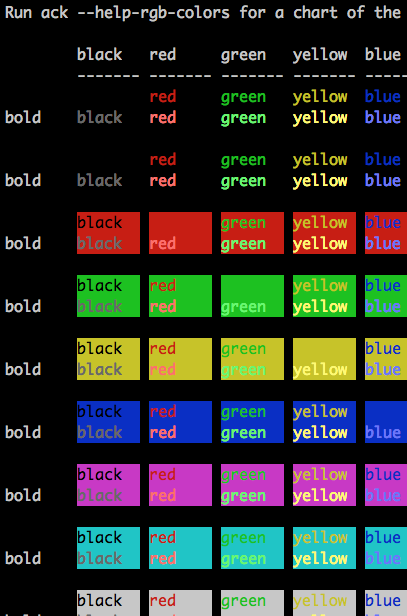
<p>The <code class="language-plaintext highlighter-rouge">--help-colors</code> option shows a chart of various color combinations using the standard eight ANSI terminal colors.</p>

<p><img src="/assets/images/2019/ack-color-chart.png" alt="ack color chart" /></p>

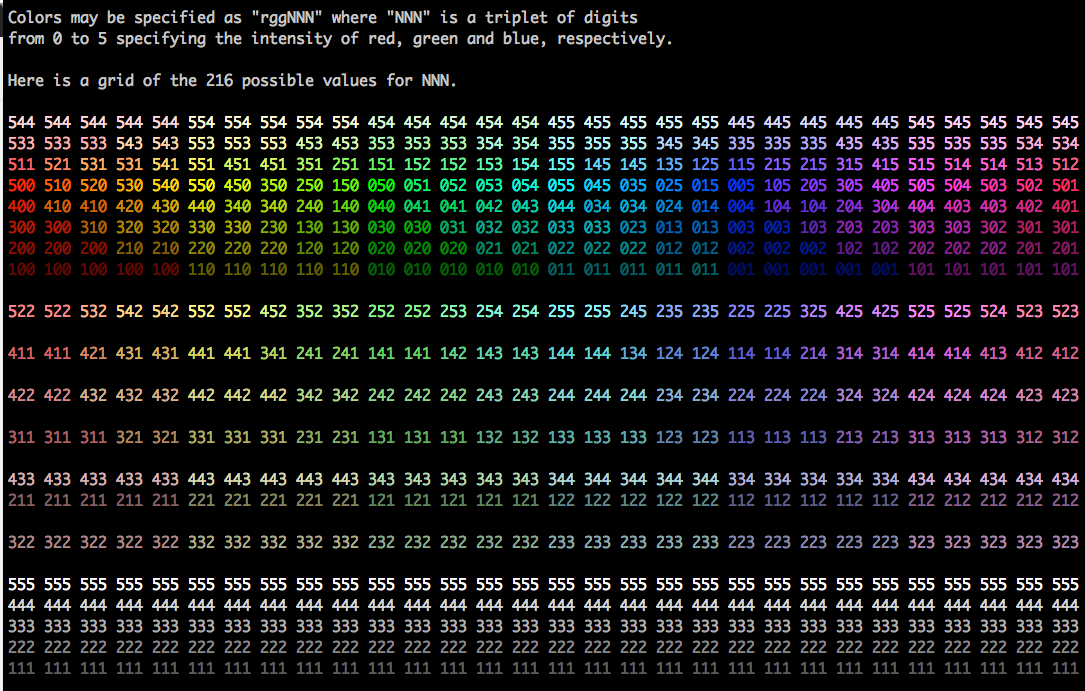
<p>The <code class="language-plaintext highlighter-rouge">--help-rgb-colors</code> option shows a grid of the 216 colors possible using RGB color specifications.</p>

<p><img src="/assets/images/2019/ack-color-chart-rgb.png" alt="ack RGB color chart" /></p>

<p>Thanks to Bill Ricker for his work in getting the RGB color chart organized in a useful way, via the
<a href="https://metacpan.org/pod/Convert::Color">Convert::Color</a> module.</p>

<p>ack is available on the CPAN, and also as a single-file download at <a href="https://beyondgrep.com">beyondgrep.com</a>.</p>

<p>Let me know if you find it useful.</p>]]></content><author><name>Andy Lester</name></author><category term="Perl" /><category term="ack" /><category term="Convert::Color" /><summary type="html"><![CDATA[I’ve released ack 2.28 to the CPAN. This release doesn’t add any major new features, but for those who like to customize things, there are two new help options: --help-colors and --help-rgb-colors.]]></summary></entry></feed>